
MycadHELPER is a Computer-Aided-Drafting-User-Interface (caduserinterface) designed for AutoCAD and other Autolisp supported drafting programs such as ACTCAD.
MycadHELPER has a long history, beginning forty years ago as “CADSPEAK”, a simple collection of command aliases to reduce command input until today and still using alases and the command line, MycadKEYS is the command interface of MycaHELPER. A sophisticated, comprehensive collection of minimum-length but understandable and memorable aliases drive both enhanced native AutoCAD commands and a suite of powerful additional custom functions.
Over the years AutoCAD has developed many menu systems and screen aids to assist learning and command input but none has been as enduring, complete and effective as the command-line. MycadHELPER, with MycadKEYS, MycadFUNS, MycadLAYERS and the professional interface of MycadZONES has evolved the command line into a modern AutoLISP productivity system that turns ordinary drafters into professionals.
Imediately obvious to and sometimes briefly disorienting for new users is the dramatically reduced use of the keyboard coupled with this a CLEANSCREEN WORKSPACE allowing attention to be focussed on the drawing rather than menus and drafting controls.
Subtle but powerful additions to command execution provide an extended ranges of OSNAPS and geometric point constructions. For example the single mnemonic key “E” (NO <enter>) replaces the 3-keypress osnap “E” “N” “D” (PLUS<enter>)
Enhanced OBJECT SELECTION also adds to command efficiency. Almost every command option is executed by single a keystroke, dispensing almost completely with the frustrating repeated confirmatory <enter>. For example “W” (window NO <enter>).
MycadHELPER is for professionals and those wanting to become professional. The system ultimately leads to MycadZONES, a professional drafting tool for Coincident-Overlay-Drafting (COD) that manages layers, reduces drafting effort and improves efficiency and accuracy of production drawings.
This is all the outcome of 40 years of intensive use of AutoCAD and AutoLISP by a technically oriented Architect. Other important by-products of HELPER are HELP for beginners in learning AutoCAD commands. Work-flow is improved, greater efficiency and accuracy in the drawings is a major gain but perhaps the most important feature is greater production and profitability for advanced users.
A last word….the most obvious aspect of MycadHELPER is its clean-screen and keyboard-only input of commands so if you are dependent upon Ribbon graphical menus…..FORGET-IT…HELPER is not for you! If you doubt me…read “Why I use the commandline”.
One author has commented “Graphic menu systems are fundamentally flawed. Can you imagine playing a piano using only a mouse to select keys? One at a time?”
Summary.
MycadHELPER will completely change your perception and use of AutoCAD or AutoCAD-like programs that offer Autolisp customisation. No longer do you have a cluttered screen and endless obscure menu icons but offers the most efficient and easily learned method of working with Autocad. MycadKEYS offers a very extensive and efficient combination of Command Aliases driving both standard AutoCAD commands, an extensive and simply CLEVER collection of Smart Command Functions. MycadLAYERS offers an Automated Layer Creation and Managment system that outperforms AutoCAD’s standard layer controls and for advanved users facilitates Coincident Overlay Modelling (COM) to create WORKZONES; a powerful production-drawing method.
MycadHELPER not just another collection of command aliases nor is it a program replacement for Autocad or a particular profession. ‘HELPER is an enhancement for all CAD programs that offer LISP user customization. MycadHELPER does not attempt to compete with or change the special functions of your CAD program but instead provides significant enhancements to the user interface of generic commands plus its own special command enhancements. And it does this for most programs offering AutoLISP.
The bottom-line is that MycadHELPER will be most appreciated by experienced drafters looking for a professional advantage but will also help newer users to learn to use Autocad and its commands more quickly and effectively. Scrap the Ribbon – learn the commands and their aliases and release the power of AutoCAD..
Key features of MycadHELPER
- Supports a CLEAN SCREEN – no Ribbon menus needed.
- Eliminates hunting for menu icons – commands and responses are entered directly to the command line.
- Solves the problem of inconsistent, confusing and incomplete command ALIAS names. MycadHELPER’s proficiently designed command alias method provides for every command in a systematic, understandable and easily remembered way.
- Most command aliases are one, two or three characters, a few complex ones may be more. Only composite commands or complex or multifunction commands exceed two.
- Speeds learning of AutoCAD and encourages learning of commands and their responses and is a proactive rather than reactive approach to Autocad..
- AutoCAD’s Commandline was the first and always has been the best way to control CAD.
- At the professional end MycadHELPER offers optional COINCIDENT-OVERLAY-MODELLING to produce WORKZONES (production drawings) that reduce drawing effort, speed up and simplify editing, increase accuracy and alignment of multi-level multi-function data-models ready for plotting.
- Solves the problem of naming and use of LAYERS.
MycadHELPER is Best for:
- Beginners wishing to understand how AutoCAD really works
- Experienced CAD drafters looking for improved production
- Small drafting businesses searching for a business edge
- Architects, Engineers and other similar professionals wanting to produce more efficient and accurate drawings
- CAD managers seaking to improve understanding of CAD and production output
Not for:
- Casual users
- Ribbon-menu-only users
- CAD-is-just-a-job drafters
MycadFUNS.
MycadHELPER provides a range of drawing tools such as:
- Object Snapping. Required by most drawing commands OSNAPS are greatly enhanced; providing twenty points about double that of AutoCAD. Only a single character is needed and <enter> is NOT required.
- Object Selection. Required by most editing commands is much faster and provides twenty ways of selecting objects. De-selecting objects is also more fluid since it can be done with the right mouse button rather than pressing the shift key. Only a single character is needed. <enter> is NOT required.
- Data-picks. Extraction of data properties such as layer-name, color and line-type, text strings, block names. polyline widths and more, using a mouse pick rather than Listing an object then typing long keyboard entries.
- Status-line. Iprovements to the status line provide current layer-name and name length setting, Workzone, Dimscale, linetype-scale and full drawing path.
- Dimension and Text styles. To suit chosen professions are created automatically on start-up.
- Auto-save. An optional addition to AutoCAD’s automatic save provides an extra backup facility that creates two alternating permanent back-up files.
- Automatic graphic standards. Customizable to office preferences.
- Multiple default options and user pre-sets.
- Multiple object editing.
- Enhanced TEXT command.
- Enhanced DIM command.
MycadLAYERS and WorkZONES
Layers and WorkZONES are the two most important aspects of professional drafting.
HELPER provides an automated Layer Naming Standard and system that not only makes Layer creation and Management much easier but also sets up Layers to a user optional system for job specific use that results in automated creation and management of defined production drawings. MycadHELPER calls these layer collections WorkZONES that define the content production drawings such as plans or cross-sections level by level and trade by trade. CAD managers will be especially interested in the ultimate power of MycadZONES that provide a layer management system that facilitates Coincident Overlay Modelling to produce finished production-drawings. MycadZONES provides the strategy and functions to manage production drawings such as plans, sections, elevations, levels, trade-zones etc. `ZONES differs from standard layer manager tools in that it provides a way to automatically manage drawings in the same single model single file. (Do not confuse WorkZones with WorkSpaces. Workspaces is an AutoCAD concept to save drafting environments, Workzones is about setting up production drawings).
Questions:
- 1. What does
`HELPER cost? - 2. Will `HELPER improve my CAD skills?
- 3.How long will it take me to learn `HELPER?
- 4.Is learning `HELPER worth the effort?
- 5.Will I become locked into `HELPER.
Short answers:
- 1.`HELPER will cost you nothing.
- 2.Yes you will become a faster smarter drafter.
- 3.You will be effective within one week and professional within one month.
- 4.`HELPER will be the most valuable step you have taken in becoming a CAD professional.
- 5. `HELPER is easily transported wherever you go and if necessary it can be run from your personal external HD Drive or USB stick.
Example of ‘HELPER WorkZONES
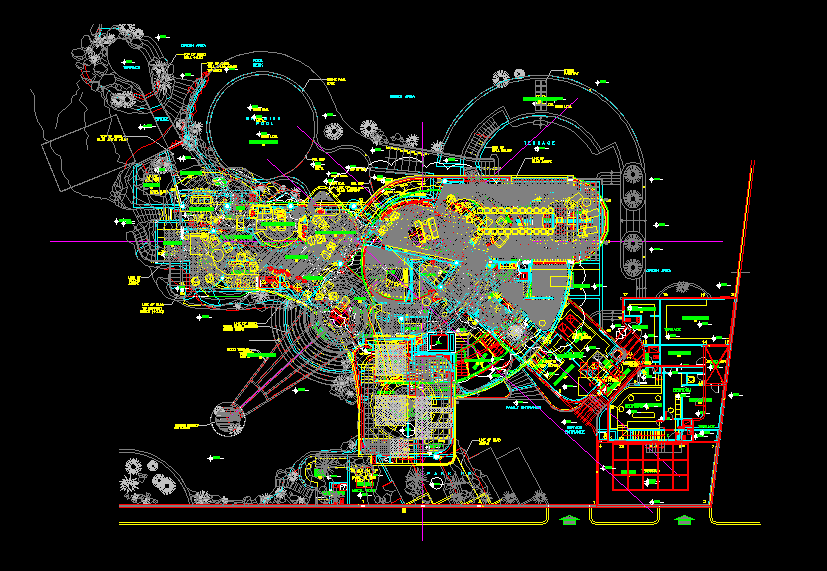
Here is a project with all of its plan information for 5 floor levels overlaid.
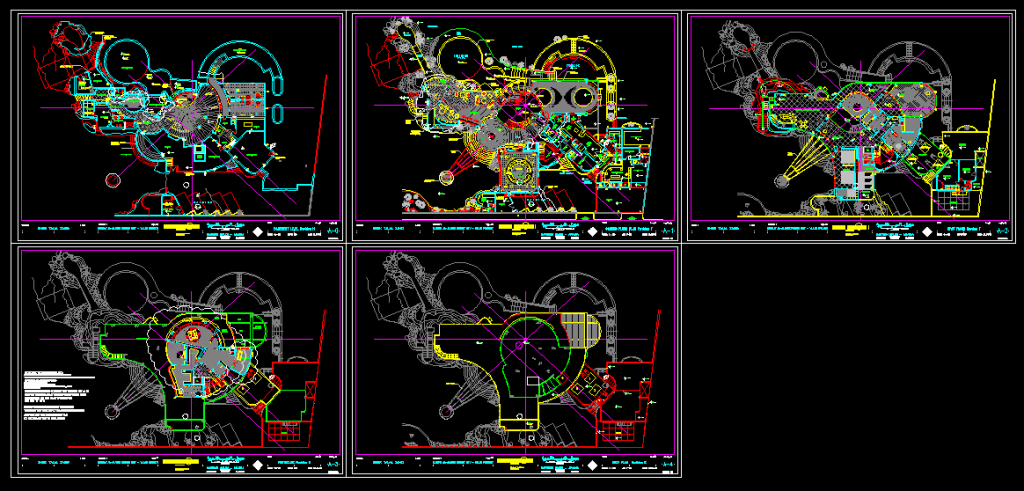
Here is the same project with layers filtered for editing and plotting.
WorkZones vs BIM?
AutoCAD has significant underused capabilities of Overlay modeling that can avoid the common errors of alignment and clashes inherent in traditional methods of side-by-side drawing. The advanced automated layer management that comes with MycadLAYERS and MycadZONES not only facilitates but encourages and automates Coincident Overlay Modeling to produce multi-discipline, multi-level, single integrated models saving time and enhancing data integrity. With both Building Information Modeling (BIM) and 2D drafting the data extracted is only as good as the data put in. In less complimentary colloquial terms “garbage in garbage out”. Overlay modeling provides an excellent opportunity to ensure good data in, but only if the designer and the program ensures accuracy and completeness.
MycadHELPER’s Overlay-Modelling and WorkZONES may not be a solution for complete BIM but they are powerfull aids to the accuracy and completeness of a building or other product model.