Introduction
Computer Aided Drafting (CAD) is used to produce illustrations of how to build or manufacture products. This often includes such as floor plans, elevations, construction details and may require many types of information combined into views such as floor-by-floor, building trade-by-trade and perhaps even production phase-by-phase. “Layering” is a technique used to classify differing object types so that each can be separated for editing or selective combination into production drawings.
The common explanation of a LAYER is; “like a transparent overlay sheet in manual drafting” but this author (in spite of originally learning to draft on linnen with indian ink…with a split-knib pen) has always recognised that the concept of CAD layers is about data classification…not location. FORGET the transparent sheet description because, while simple to explain, it limits understanding of the real purpose and benefits of layers.
CAD OBJECTS are given many different properties describing their function and appearance but the key OBJECT PROPERTY is a LAYERNAME that is unique to objects of the same function. It is this property that is used to manage the visibility, editability and prointing of objects.
Each OBJECT has several properties including a LAYERNAME. The layer name refers to a separate list of property values relating to the appearance, visibility and editability of objects with that layer name.
The key point is to distinguish between object-property NAMES and object-property VALUES. Properties belong to OBJECTS not LAYERS. Some object property VALUES are directly applied to the object. Others may be rererenced from a layer-property-value-list. Thus a LAYER is a list of object property VALUES that can exist without any objects or apply to many objects.
- Property – The specific OBJECT property called “Layer” that tells the CAD system the name of a relevant list of property VALUES.
- Name – The NAME of a property list supplying the VALUES decribing the particular object.
- List – The list containing the properties and their values that relate to the particular object.
- Collective term – for objects of same physical nature, apperance, visibility and editability. i.e. have the same layer name.
Thus; objects have a full list of properties including geometric and other properties and a reference-layer-name,. The issue is; how do OBJECTS aquire their individual property values? Several properties (particularly geometric properties) aquire their values from the drawing process and the current system settings (including “CLAYER” – the current-layer). Appearance property values may be assigned directly to the object or selected from the layer-property-list; for example the object property “Color” may be optionally applied directly to the object, e.g. Color = Red, or referenced from its layer property list, e.g. Color = BYLAYER.
BYLAYER is the most common approach as it allows multiple objects with the same layer-property-name to have their appearance and editing properties managed by changing value of that property in the relevant layer-property-list.
AutoCAD is commonly confiigured so that when starting a new blank drawing property values default to BYLAYER. However many propety values are by default made “BYLAYER” e.g. property ID = Color, property value = BYLAYER. There is of course no color “BYLAYER” so when the object is displayed on the screen or printed its color is referenced from the specified layer definition.
Notes:
- There is no formal description in AutoCAD for properties directly assigned to objects but some CAD users loosely call them by-object.
- While layernames can be used to identify like objects by their properties, a layer is not a specific group or number of objects.
- A layer has nothing to do with anything physical such as an overlay-sheet.
- The confirmation being that a layer-property-list may be un-referenced, (empty).
- There can be as many different layer definitions as there are objects in a drawing.
- Objects of the same object type can reference and be identified by a single named and saved layer-properties-list.
- Once created, all layer-lists remain in the database unless PURGED.
- All objects on a layer look the same.
- Change the layer once instead of many individual objects.
- Most CAD standards expect objects to use BYLAYER.
- Lineweights and colors can be controlled through layers.
Layer 0
All drawings by default have a layer 0 (zero). i.e. the OBJECT property LAYERNAME is “Layer” its VAUE is “0”. Other layers can be created as the drawing progresses. Whatever layer is current when an object is created becomes the VALUE of that object’s LAYERNAME. By default the values of Layer 0 in a new blank drawing will be Color white or black, Lne-type continuous, Line-weight 0. (Is that why it is called “0” or is it because technically the fist digit in a number series begins with 0?)
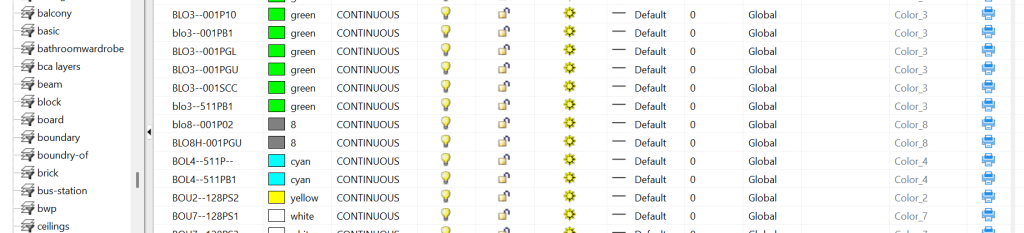
Layer 0 might look like this:

A typical LAYER record
| Function | Controls |
|---|---|
| Identification | Name, Description |
| Appearance | Colour, Linetype, Lineweight, Transparency, Material |
| Output | Plot Style, Plot/No Plot |
| Visibility | On/Off, Freeze/Thaw, VP Freeze |
| Editing | Lock/Unlock |
| Viewport Management | New VP Freeze |
| Organisation | Current, In Use, Xref-dependent, Filters |
Typical object property list using BYLAYER
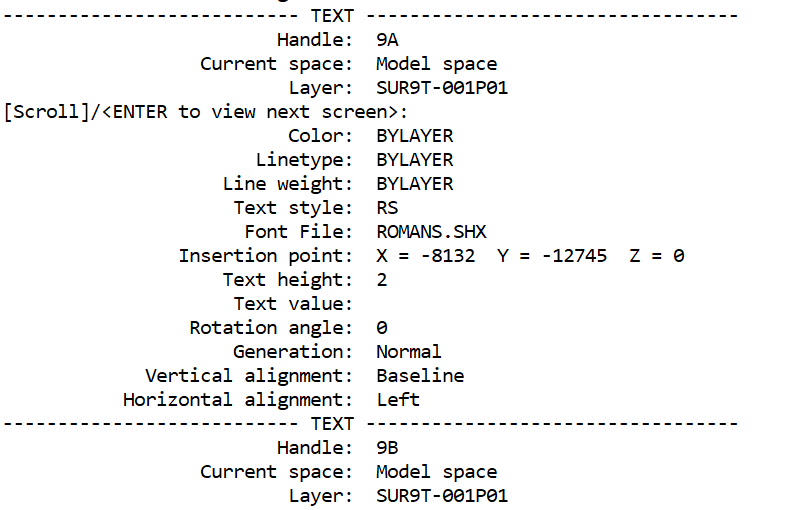
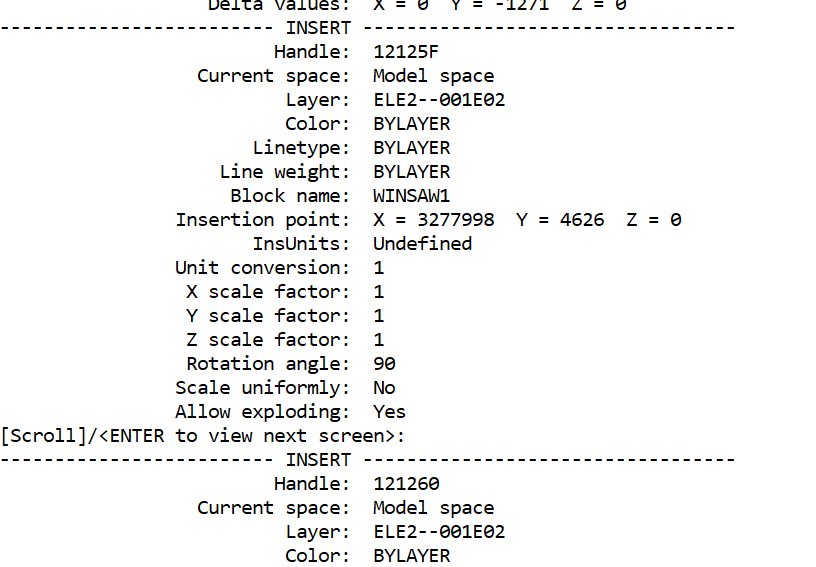
Typical record of an INSERT
Properties that can be inherited BYLAYER
Appearance properties
- Colour
- Linetype
- Lineweight
- Transparency
- Material
- Plot Style
Other properties that affect layers
- Layer Name
- Description
- On/Off
- Freeze/Thaw
- VP Freeze
- Lock
- Plot/No Plot
- Filters
- Layer States
- Reconciliation
Controls that mange groups of layers
- Filters
- Layer States
- Reconciliation
Renaming layers
When a layer is renamed:
- The layer definition receives a new name.
- All objects referencing that layer automatically update their Layer property.
- The visual appearance does not change unless the new layer definition differs.
Moving objects between layers
A layer is an environmental condition with a list of property settings (with or without objects) not a LOCATION from or to which objects may be moved. Objects are not moved into layers. Their Layer property is changed to reference a different layer definition. Renaming a layer effectively creates a NEW layer with a new name albeit it may have the same properties as the former. The LAYER definitions remain in the system whether or not there are any objects that reference them. Changing appearance properties of an object from BYLAYER to a specific value does not change the LAYER’s application to other objects with the same LAYER-NAME. Unreferenced layers may be purged.
CHPROP lets you change:
- Color
- Layer
- Linetype
- Linetype Scale
- Lineweight
- Thickness
- Transparency
- Material
- Annotative setting
- Plot Style (when named plot styles are used)
Other useful commands:
- MATCHPROP — copy properties between objects
- LAYMATCH — match objects from another layer
- LMAN — manage layer states
Opinion. Some tutors recomend creation of a template drawing with pre-named and pre-defined layers before any objects are created thus avoiding the delay of having to repeatedly create new LAYER-NAMES and define new property lists. A counter effect is that the drawing database may become overloaded with irrelevant lists of properties that must then later be PURGED. In the opinion of the author It is better to have a manageble layer naming standard that can easily and more conveniently create and manage layers on-the-run rather than searching lists to find an appropriate name with appropriate properties.MycadLAYERS dialogue to create ‘HELPER layers
What about MycadLAYERS?
Later I will show how a layer NAME can imply many other layer properties not mentioned by the CAD program. Concepts such as construction-phase, drawing-function, view point and drawing cross-section or floor-level. This will lead to a separate discussion of layer-naming standards and coincident-overlay-modelling.
Examples of Layer names created by MycadLAYERS
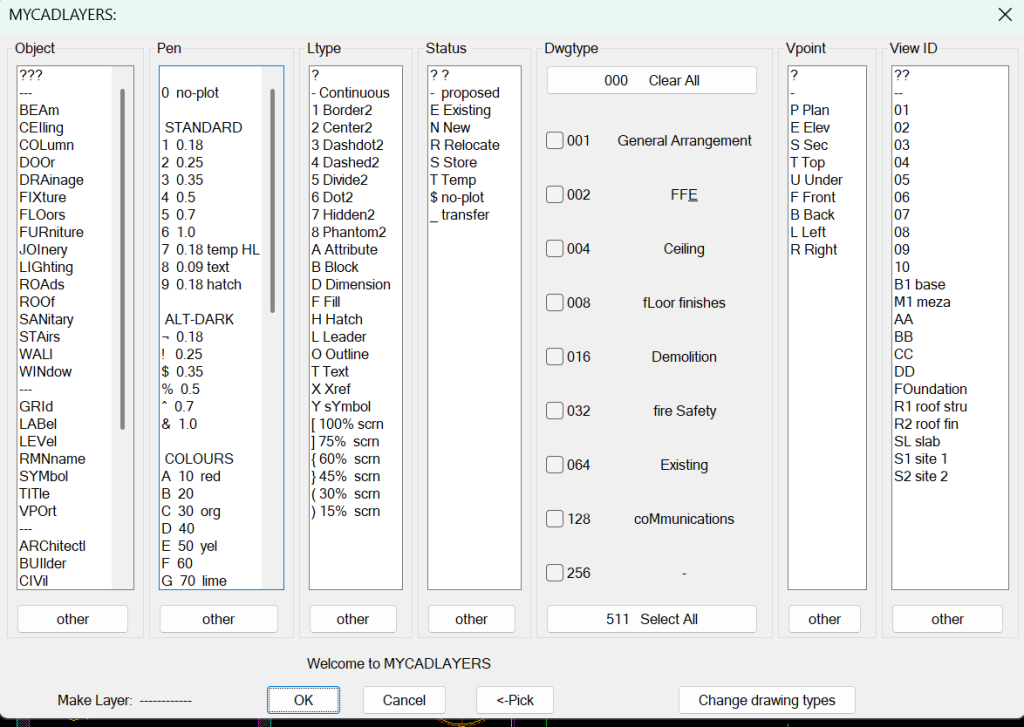
Example of several complex layer names generated by MycadLAYERS