
Welcome to MycadHELPER – the biggest improvement to your CAD skills that you could ever make:
MycadKEYS including its uniquely effective ALIASES is currently being UPGRADED and re-styled as MycadHELPER. You are invited to request a FREE copy to improve your CAD productivity. If you help in its further development you may keep MycadHELPER FREE.
INVITATION to use MycadHELPER FREE
You have found my website so you must be interested in improving your CAD skills. I know that you would prefer a video but that will come later. Let me explain what MycadHELPER is all about.
Let me make some personal observations about CAD programs and tutorials in general. Autodesk and other program writers rarely say anything about how to produce GOOD drawings EFFICIENTLY. Instead and understandably so they focus on how to use the program, usually using menus. Disappointingly this is also largely true of most tutorials that rarely use the do this and now do this approach but rarely discuss how to construct efficient and meaningful drawings. MycadHELPER was developed expressly to make the drawing process more efficient, reduce drawing effort and make drawings more accurate, informative and better structured. In MycadHELPER I try to explain how AutoCAD works, the best way to use it and what some simple customisations can do to make your work more efficient.
In addition to wondering what MycadHELPER does you will be wondering:
1. What does MycadHELPER cost?
2. Will MycadHELPER improve my CAD skills?
3.How long will it take me to learn MycadHELPER?
4.Is learning MycadHELPER worth the effort?
5.Will I become locked into MycadHELPER.
Short answers:
1.MycadHELPER will cost you nothing.
2.Yes you will become a faster smarter drafter.
3.You can get started within one hour, will be effective within one week and professional within one month.
4.MycadHELPER will be the most valuable step you have taken in becoming a CAD professional.
5. MycadHELPER is easily transported wherever you go and if necessary it can be run from your personal external HD Drive or USB stick.
MycadHELPER is a custom user interface add-on for standard Autocad and any other Autocad-like drafting programs that incorporate Lisp programming. It is an integrated collection of Autolisp functions to reduce drawing, drawing and plotting effort.
MycadHELPER eliminates a need for graphical menus and long command names, reduces keystrokes during command execution and adds many drafting assist tools such as Osnaps and Select object options. Importantly it provides advanced Layer and Workzone commands. MycadHELPER is so divergent from conventional CAD menu based techniques and commands and is such an in-depth program that it requires a change of mindset and some initial effort and commitment to get started. BUT once used you will never give it up because it will DOUBLE your output and it is enjoyable to use.
MycadHELPER focuses on MycadKEYS, MycadLAYERS and MycadZONES but for simplicity it is all referred to as MycadHELPER because the first thing you will notice is that it is keyboard Commandline-based user interface. The second is the extraordinary reduction in keystrokes required to execute commands. MycadHELPER is for CAD professionals and is about fast efficient drawing input and the organization of drawing data in a professional manner for viewing editing and printing. However due to the nature of its commandline approach and discarding of time wasting menus it actually helps new drafters to rapidly pick up a good knowledge of commands and hoe to produce accurate professional quality drawings.
Underpinning MycadHELPER is MycadLAYERS and MycadZONES that between them provide an automated Layer Naming Standard and functions to create and manage professional production drawings.
MycadZONES is an advanced optional outcome of MycadLAYERS. It provides the strategy and functions to manage the WORKZONES into which your drawing objects are organized (plans, sections, elevations, levels, trade-zones etc.) MycadZONES differs from standard layer manager tools in that it provides a way to automatically manage multiple WORKZONES in the same single model single file.
MycadKEYS/CLUES/LAYERS/ZONES are not just another collection of command aliases nor are they a program replacement for Autocad or a special “vertical” add-on for a particular profession. MycadKEYS/F/L/Z is an enhancement for all CAD programs that offer LISP user customization. MycadHELPER does not attempt to compete with or change the special functions of your CAD program but instead provides significant enhancements to the user interface of generic commands plus its own special command enhancements. And it does this for all Autocad-like programs.
The bottomline is that MycadHELPER will be most appreciated by experienced drafters looking for a professional advantage but will also help newer users to learn to use Autocad and its commands more quickly and effectively.
MycadHELPER:
- Provides a CLEAN SCREEN – no Ribbon menus needed.
- Eliminates hunting for menu icons – commands and responses are entered directly to the command line.
- Solves the problem of inconsistent, confusing and incomplete command ALIAS names. MycadHELPER’s proficiently designed command alias method provides for every command in a systematic, understandable and easily remembered way.
- Almost all important Aliases are two or three character and only composite commands exceed two.
- Speeds learning of AutoCAD and encourages learning of commands and their responses and is a proactive rather than reactive approach to Autocad..
- AutoCAD’s Commandline was the first and always has been the best way to control CAD.
- Provided your program offers LISP customization and you are not committed to RIBBON menus you can literally double (YES DOUBLE) your rate of drawing output.
- At the professional end MycadHELPER offers optional COINCIDENT OVERLAY DRAFTING to produce WORKZONES (production drawings) that reduce drawing effort, speed up and simplify editing, increase accuracy and alignment of multi-level multi-function data-models ready for plotting.
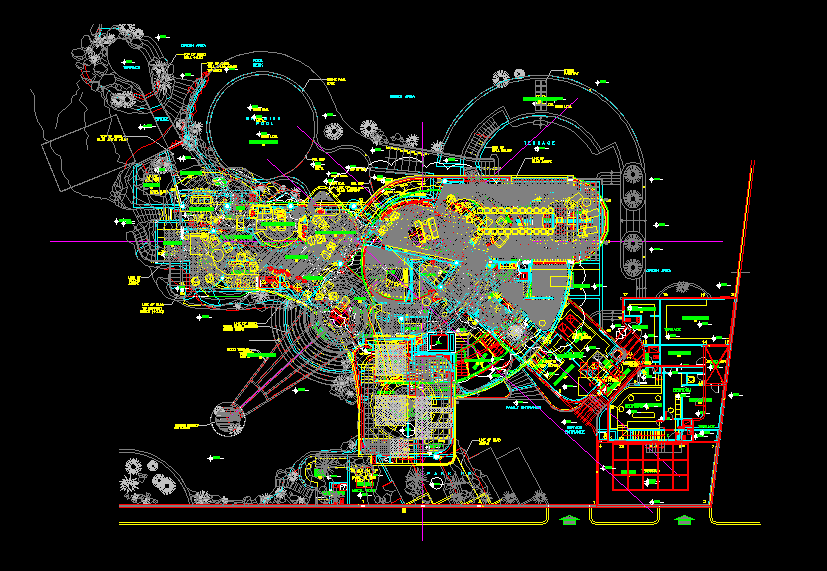
Here is a project with all of its plan information for 5 floor levels overlaid.
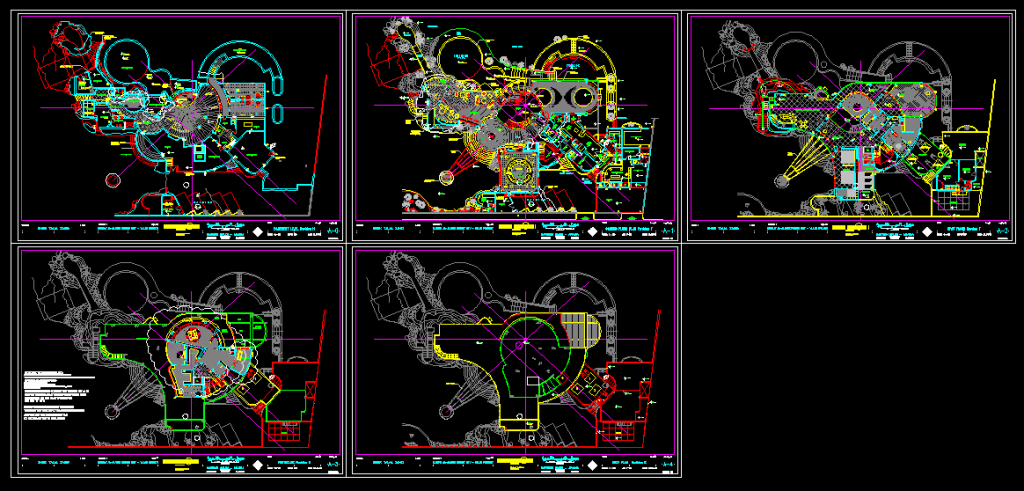
Here is the same project with layers filtered for editing and plotting.
Worried about BIM?
Finally if you are thinking about modeling programs such as Revit are you worried that 2D drafting is a thing of the past? Although some major projects may be using products such as Revit annd Archicad to produce Building Information Models (BIM) the jury seems to be still out on Revit and BIM and myths and complaints are plenty. In the the meantime AutoCAD 2D is still going strong. AutoCAD has significant underused capabilities of Overlay modeling that can avoid the common errors of alignment and clashes inherent in traditional methods of drawing and claimed to be avoided by BIM. The advanced automated layer management that comes with MycadLAYERS not only facilitates but encourages and automates Overlay Modeling to produce multi-discipline, multi-level, single integrated models saving time and enhancing data integrity. With both BIM and 2D drafting the data extracted is only as good as the data put in. In less complimentary colloquial terms “garbage in garbage out”. Overlay modeling provides an excellent opportunity to ensure good data in.
Author’s comments:
- AutoCAD is a great program but the problem is that the user interface is burdened by endless slow to use graphical menus unlike the Commandline that gives access to ALL commands. Autodesk now acknowledges this with the introduction of the new “Smart” command line. Here are a couple of good descriptions: article 1 and article 2 but as flexible and helpful as the upgraded Commandline is to the new user it is not an answer for experienced professional users who wish to reduce command input. And remember that none of Autocad’s commands or aliases do more than start commands.
- All AutoCAD has ever needed is short logical easily remembered command names and the removal of endless key pressing to confirm intentions. AutoCAD made an attempt with Aliases but these are often clumsy and random and do not cover all commands (1400 if you count system variables). Now there is an alternative. MycadKEYS.
- Changing work practices can be difficult and take time and effort and create a fear of running against the current but depending upon how well you are currently organized MycadDHELPER can put you ahead of the competition.
- MycadHELPER is especially beneficial to the Self Employed seeking a cost advantage.
- Lately smaller high resolution screens have made the Commandline even more relevant and MycadHELPER makes makes a clean screen and the Commandline work
- Are you thinking that Autocad has outlived its relevance to simple 2D drafting?
- If you are in doubt about the current relevance of Autocad have a look at NOVEDGE‘s website.
- If you are in doubt about the cost of Autocad have a look at Intellicad or BricsCAD for all intents and purposes Autocad workalikes.
- There are three “L“s in AutoCAD: Command Line, Layers and AutoLisp. MycadKEYS makes extensive use of all three providing the user interface that AutoDesk should have provided.
- To see what AutoLisp is all about jump to Customising Autocad.
- Have a look to see what experienced professional drafters think about Keyboard vs Menus.
- To try something straight away go to Getting Started.
FREE Download:
Email calfredwright@gmail.com for a free educational/trial copy of MYCADHELPER BETA program software.
Respondents helping to upgrade/improve the program will receive a single user in perpetuity license.
Standard non-contributor cost not yet determined but won’t be much.
Name disclosure:
“MycadHELPER” is a third-party Autolisp command interface for Autocad and other programs offering LISP customization.
MycadKEYS, MycadFUNS, MycadLAYERS and MycadZONES have no relationship business or otherwise with Autocad, Autodesk, MyCAD or CADKEY.
MyCAD seems to have little to do with conventional CAD programs.
CADKEY has since been renamed to “KEY CREATOR“)
- about Welcome to MYCADHELPER Read more
/
MycadKEYS – How it works.
Many drafters avoid the MycadKEYS Command line because of long command names, and sometimes long or confusing aliases plus a need sometimes for multi-character responses to command options including some of both object-snap and select-objects prompts. Most frustrating is the resulting need for repetitive pressing of <enter> to confirm completion of input because of the irregular number of characters required.
The Key to MycadKEYS is not just the improvement of command functionality but the substantial reduction in keystrokes due to the reduction of ALL command responses to a single character thus not only reducing actual command response itself but importantly removing the need for confirmation of the end of the option input.
Thus:
MycadKEYS Aliases are reduced to one, two and occasionally three keystrokes.
MycadKEYS Command options are ALL single character.
MycadKEYS OSNAP and SELECT objects options are reduced to a single character in spite of both being increased in number.
Most important of all, once a command has been started there is no need for confirming <enter>s.
The single character OSNAPs and SELECTs defined for MycadKEYS commands are also viable as Ctrl+chr accelerator keys in generic AutoCAD commands (instead of typing three characters plus <enter>). The extended range of options defined for ACADUI commands are of course not available for generic AutoCAD commands.
MycadKEYS Aliases apply not only to ACADUI commands but can also be used to initiate generic AutoCAD commands simply by prefixing the MycadKEYS Alias with a back quote “`”. Thus PL starts MycadKEYS Place Line whereas `PL starts AutoCAD LINE. Thus there is no need to retain AutoCAD’s Aliases. (Although most of them are retained).